explicit

构造用explicit声明,防止非必要的隐式转换

reference &

1
2
3
4
5
6
7
8
9
10
11
12
13
14
15
16
17
18
19
20
21
22
23
24
#include <iostream>

int main()
{
int val = 1024;
int &refVal = ival;

int ii = val;

std::cout << val << " " << refVal << " " << ii << std::endl;

val = 1025;
std::cout << val << " " << refVal << " " << ii << std::endl;

refVal = 1026;
std::cout << val << " " << refVal << " " << ii << std::endl;

return 0;
}

// 1024 1024 1024
// 1025 1025 1024
// 1026 1026 1024

IOS

devtools://devtools/bundled/js_app.html?v8only=true&ws=127.0.0.1:6086/00010002-0003-4004-8005-000600070008


Android

第一步:构建项目

第二步:AndroidStudio 打开项目 build/jsb-default/frameworks/runtime-src/proj.android-studio

第三步:使用外部 Android 设备运行项目;

第四步:

  • App 启动后控制台输入 adb logcat|grep “chrome-devtools”;

  • 输出 log 04-17 14:05:51.386 9858 10015 D jswrapper: Debugger listening…, visit [ chrome-devtools://devtools/bundled/inspector.html?v8only=true&ws=0.0.0.0:5086/00010002-0003-4004-8005-000600070008 ] in chrome browser to debug!

  • 控制台输入 adb forward tcp:5086 tcp:5086;

第五步: 浏览器打开:devtools://devtools/bundled/inspector.html?v8only=true&ws=0.0.0.0:5086/00010002-0003-4004-8005-000600070008 开始调试

事件


useCapture

node.on(event,callback,target,useCapture)

  • true: 捕获模式,从父节点开始依次捕获事件
  • false: 冒泡模式,从子节点开始依次向父节点冒泡

阻止冒泡

node.stopPropagation()

  • 阻止向父节点冒泡,当前节点其他事件监听依然有效
  • useCapture 为 true 时阻止子节点捕获

swallowTouches

  • node._touchListener.setSwallowTouches(args:bool)
    • true:穿透触摸事件

匀速贝塞尔曲线

1
2
3
4
5
6
7
8
9
10
11
12
13
14
15
16
17
18
19
20
21
22
23
24
25
26
27
28
29
30
31
32
33
34
35
36
37
38
39
40
41
42
bezier(p0: cc.Vec2, p1: cc.Vec2, p2: cc.Vec2, t: number) {
const p = p0
.mul(Math.pow(1 - t, 2))
.add(p1.mul(2 * t * (1 - t)))
.add(p2.mul(Math.pow(t, 2)));
return p;
},

async bezierUniformMove(pos: cc.Vec2, mid: cc.Vec2, target: cc.Vec2, node: cc.Node, duration: number) {
let samples: { t: number, len: number }[] = [];
let totalLen = 0;
let prev = this.bezier(pos, mid, target, 0);
for (let i = 1; i <= 100; i++) {
let t = i / 100;
let pt = this.bezier(pos, mid, target, t);
let d = prev.sub(pt).mag();
totalLen += d;
samples.push({ t, len: totalLen });
prev = pt;
}

const getTByLen = (curLen: number) => {
for (let i = 0; i < samples.length; i++) {
if (samples[i].len >= curLen) {
// 线性插值
let prev = samples[i - 1] || { t: 0, len: 0 };
let ratio = (curLen - prev.len) / (samples[i].len - prev.len);
return prev.t + (samples[i].t - prev.t) * ratio;
}
}
return 1;
}

await asyncMgr.tween(cc.tween(node).to(duration, { position: target }, {
progress: (start, end, current, ratio) => {
const cl = totalLen * ratio;
const t = getTByLen(cl);
const result = this.bezier(pos, mid, target, t);
return result;
}
}))
}

2.4.x更新lib库

开发日记

项目管理

  • 确定需求时直接判断是否大量复用,拆分成公用组件。
  • App版本号规范,MAJOR.MINOR.PATCH。

    版本迭代更新MINOR,服务器也至少通过MINOR判断对应服务器。PATCH更新不需要对应服务器。ios app每次提审后都需要更新PATCH版本号,因此如果使用PATCH对应服务器版本则提审后再次更新都需要更新对应服务器。

目录结构

定义类型声明

  • 通用类型声明最好放一块, 便于查找, 避免定义过多重复类型。
  • 单独类型放入各自目录下, 避免于通用类型声明混淆。
1
2
3
4
5
6
7
scripts/
├── interfaces/ -->接口
│ ├── IUser.ts
│ └── IReward.ts
├── activities/activity/ -->某单独活动
│ └── interfaces/
│ └── IActivity.ts

代码大全

软件构建中的设计

代码设计基本特性

  • 最小复杂度
  • 易于维护
  • 松散耦合
  • 可扩展性
  • 可重用性
  • 高扇入 (大量的类使用给定的类, 例如工具类)
  • 低扇出 (一个类适中地使用其他类)
  • 可移植性
  • 精简性
  • 层次性
  • 标准技术
    Read more »

《DirectX12 3D 游戏开发实战》

Q&S


Common

  • “HANDLE CreateEventExW(LPSECURITY_ATTRIBUTES,LPCWSTR,DWORD,DWORD)”: 无法将参数 2 从“bool”转换为“LPCWSTR” DirectX12\Common\d3dApp.cpp 535

    • VS2019 报错,将 CreateEventEx(nullptr, false, false, EVENT_ALL_ACCESS); 第二个参数false改为nullptr;
  • LNK2019 无法解析的外部符号 _main,函数 “int __cdecl invoke_main(void)” (?invoke_main@@YAHXZ) 中引用了该符号 DirectX12\D3DCommon\MSVCRTD.lib(exe_main.obj)

    • 初始化时没有将项目设置为桌面应用程序,右键项目-> 属性 -> 配置属性 -> C/C++ -> 预处理器 -> 预处理器定义中将_CONSOLE 改为 _WINDOWS;../-> 链接器 -> 系统 -> 子系统改为”窗口 (/SUBSYSTEM:WINDOWS)”

Mac

Ruby

  • rvm 安装 ruby 报错。

    1
    2
    3
    4
    5
    6
    7
    8
    9
    10
    11
    brew install ruby
    // 查看自己安装的是哪个版本

    rvm mount /usr/local/Cellar/ruby/3.4.2
    // mount命令好像会让你自己起名,没起直接用默认的了。

    // rvm list查看名字
    rvm use ext-ruby-3.4.2-rd2930f8e7a --default

    // use后环境可能有问题,重登shell ruby依然使用的系统ruby,直接重装rvm
    rvm get stable --auto-dotfiles
  • rvm 安装警告,乱七八糟的问题。

    1
    2
    3
    4
    // 直接重装
    rvm implode
    \curl -sSL https://get.rvm.io | bash
    source ~/.rvm/scripts/rvm

Linear Algebra

向量绝对值

  • ||v|| = √(x^2+y^2+…)

Dot Product 点积、内积 P·Q

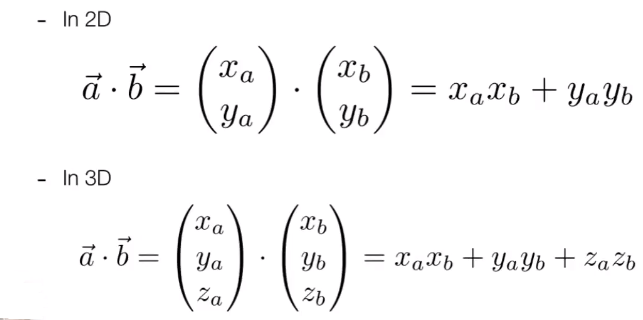
几何定义:
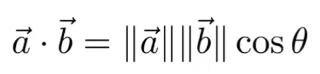
avatar

代数定义:

avatar

主要用于

  • 计算向量夹角余弦值

  • 计算a向量在b向量上的投影: a的单位向量乘以b向量长度再乘以两向量夹角余弦
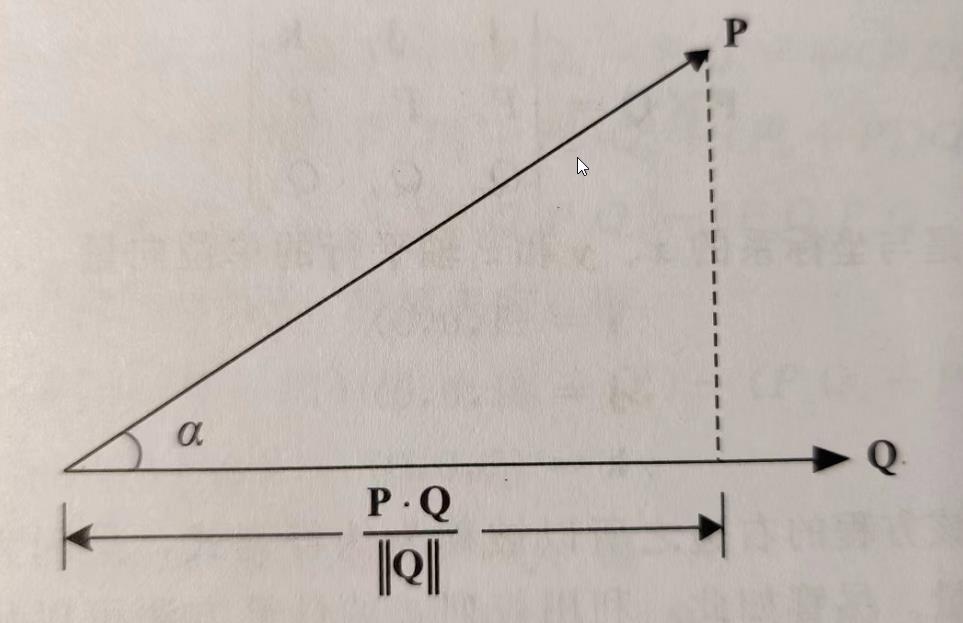
    avatar

  • sqrt(dot(a,a)) = length(a)


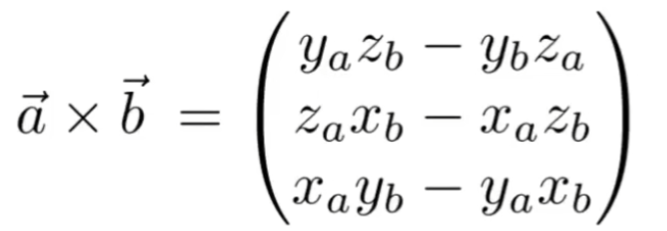
Cross Product 外积 P x Q

||PxQ|| = ||P|| ||Q|| sinα

代数定义:
avatar

主要用于

  • 判断左右,右手螺旋定则,a x b,z为正则在a左侧,反之则右侧,0两个向量平行
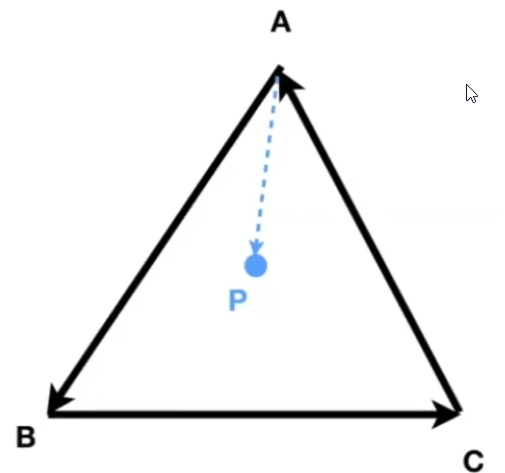
  • 判断点是否包含于图形
    avatar
    AB x AP, BC x BP, CA x CP, 若z值同向则包含ABC包含P

Orthonormal bases 正交,内积为0则为正交向量

Coordinate frames


ShaderToy

1
2
3
4
5
6
7
8
9
10
11
12
// 平滑过渡
float smoothstep(float a, float b, float x){
// saturate 取0 ~ 1范围内的值
float t = saturate((x - a)/(b - a));
return t*t*(3.0 - (2.0*t));
}

// 混合函数
vec3 mix(vec3 x,vec3 y,float a){
return x * (1. - a) + y * a;
}

类型

  • 声明对象
    • object:
      1
      2
      let person = new Object()
      let person = {}
    • Array:
      1
      2
      let arr = new Array()
      let arr = {}

检测类型

  • 基础数据类型

    • undefined,null,boolean,number,string,symbol
  • 引用数据类型

    • object
  • typeof

    • “undefined”
    • “boolean”
    • “string”
    • “number”
    • “object” 对象或者 null
    • “function”
  • 引用类型

    • instanceof
  • 检测数组

    • Array.isArray()
  • 检测类型

    1
    2
    Object.prototype.toString.call()


实现重载

1
2
3
4
5
6
7
8
9
10
function addMethod(obj,name,func){
var old = obj[name];
obj[name] = function(){
if(arguments.length === func.length){
return func.apply(this,arguments);
}else if(typeof old === "function"){
return old.apply(this,arguments);
}
}
}

数组操作

  • push() 推入数组末尾
  • pop() 从数组末尾取出
  • unshift() 数组前端添加
  • shift() 数组前端取出

栈操作

  • push() 推入 pop()取出

队列操作

  • push() 推入 shift()取出

操作数组

  • slice(a,b) 返回 a-b 之间的值,含 a 不含 b
  • splice(a,b,…) 删除 a 开始,b 个值,包含 a. 再插入…

EventLoop

event loop 主要为三个部分,主线程,宏队列,微队列。

宏队列:settimeout/setImmediate、I/O、UI rendering。

微队列:promise.then、process.nextTick

执行顺序

  1. 先执行主线程

  2. 遇到宏队列(macrotask)放到宏队列(macrotask)

  3. 遇到微队列(microtask)放到微队列(microtask)

  4. 主线程执行完毕

  5. 执行微队列(microtask),微队列(microtask)执行完毕

  6. 执行一次宏队列(macrotask)中的一个任务,执行完毕

  7. 执行微队列(microtask),执行完毕

  8. 依次循环

1
2
3
4
5
6
7
8
9
10
11
12
13
14
15
16
17
18
19
20
21
22
23
24
25
26
27
28
29
30
31
32
33
console.log(1)
process.nextTick(() => {
console.log(8)
setTimeout(() => {
console.log(9)
})
})
setTimeout(() => {
console.log(2)
new Promise(() => {
console.log(11)
})
})
requestIdleCallback(() => {
console.log(7)
})// 特殊说明: new Promise()属于主线程任务
let promise = new Promise((resolve,reject) => {
setTimeout(() => {
console.log(10)
})
resolve() // 这个console也属于主线程任务
console.log(4)
})
fn()
console.log(3)
promise.then(() => {
console.log(12)
})
function fn(){
console.log(6)
}

log: 1 4 6 3 12 8 2 11 10 9 7

call() bind() apply()

1
2
3
4
5
6
7
8
9
10
11
12
13
14
15
16
17
18
19
20
21
22
23
24
let C = {
bName: "bName",
func: function (a, b, c) {
console.log("func", this.bName, a, b, c);
},
func1: () => {
console.log("func1", this.bName);
},
};

this.bName = "gName";

C.func(1, 2);
C.func1();
C.func.call(this, 1, 2, 3);

let f = C.func.bind(C, 1);
let f1 = C.func;
let f2 = C.func1;

f(4);
f1(1, 2, 3);
f2();

Deploy

Error:

Error: listen EACCES: permission denied 0.0.0.0:xxxx

- 检查端口是否被占用 netstat -ano|findstr "xxxx" (windows);
- net stop winnat
  net start winnat

Unity VR

环境配置

Project Settings

  • XR Plug-in Management -> Oculus -> Stereo Rendering Mode -> Multi Pass

  • Player -> android -> Other Settings -> Graphics APIs 添加 OpenGLES3

Build Settings

  • Android

    • Run Device -> Oculus Quest -> Switch Platform

    • Texture Compression -> ASTC

0%